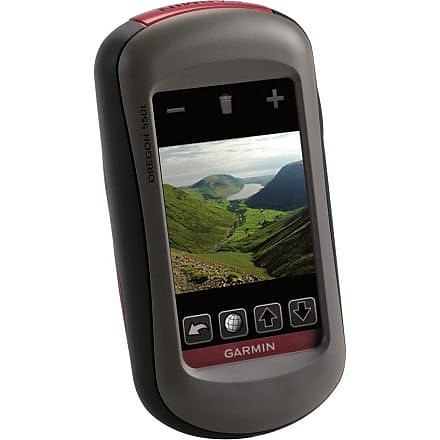
Garmin Oregon 550t



 Reviewed by
steverod
+75
March 31, 2010
This is a great GPS unit for hiking, but it's pricey and has a screen that can be hard to read. The best part has been that it's been getting steadily better with firmware updates from Garmin.
The Oregon is my second GPS unit, after a DeLorme PN-40; that was a promising GPS that was just annoying enough to make me look at a Garmin. I use the unit primarily for planning and tracking hikes, both day hikes and backpacking; I don't do any geocaching (which is something the Oregon is optimized for).
The Oregon 550t's signature features are:
- a touchscreen interface instead of the array of buttons you find on other GPS units;
- a built-in 3MP camera;
- built-in 1:100K topographic maps of the US.
When I purchased the Oregon, the Dakota series had just been announced; these are also touchscreen units but are smaller and lower resolution. I decided that I wanted the bigger screen and haven't been disappointed. The Oregon's higher resolution comes at a cost, which is screen brightness -- the Dakota is said to be considerably more legible in a number of situations, particularly on a fixed mount (i.e. a bicycle) but I have not found screen legibility to be a big deal while hiking: I can just move the unit.
Since I purchased the Oregon, Garmin has updated the unit's firmware several times, most notably with their announcement of Custom Maps, which let you load all sorts of imagery on the device, including scanned USGS topo maps, aerial imagery, or even scanned maps that you find around. The particularly cool thing about Custom Maps is that you can use whatever imagery you find (the PN-40 lets you use scanned maps but you either have to use DeLorme's imagery or pay extra to use your own).
Things I like about the Oregon:
- The touchscreen interface is wonderful, After using this, there really is no going back to the old button-laden models.
-Battery life is a gripe for many but I find it to be far better than my old PN-40; I can easily imagine using the Oregon for a multi-day hike without freaking out over batteries. I have not done timed tests but I find that even AA batteries will last a good while in the unit.
- Signal acquisition and retention is rock-solid. I don't know if I've ever lost a GPS signal except deep inside a building or a tunnel.
- There is a large community of people making Garmin-compatible maps and technology. GPSFileDepot is full of topographic and other maps I can load on the Oregon; there are sites that make OpenStreetMap data available for free, even routable! Garmin sells map data but you're not stuck with what they provide. Their Custom Maps technology is supported by third parties, so now I get all sorts of custom map data available via TopoFusion.
- It works (kind of) with my Mac. Garmin has their tools available natively under MacOS as well as Windows; more importantly, you don't need to use their tools to use it with a Mac. It's easy to import routes and tracks from web sites onto the Oregon, and similarly easy to move them off the Oregon straight to trail-sharing sites.
- It's generally very easy to use, obvious what something does, and has a very polished user interface.
- Garmin is actively developing new features -- there have been 7 updates in the 6 months since I bought my Oregon and they have added a bunch of nice functionality (not just basic functionality that was missing before).
Things I don't like about the Oregon:
- The screen is not as bright and readable as I'd like. This appears to be an inherent problem with high-resolution screens, unfortunately. I find that I need to have the backlight turned way up; the Dakota does much better in this regard, apparently. However, since I mostly hike (rather than cycle or run), it's generally easy enough to turn the unit so that it is readable.
- Because the buttons are on the screen, you rarely have many of them, and it's easy to get many many menus deep, and then find yourself having to wade all the way back out. This impairs usability in that it sometimes takes a very long time to do something, as you have to exit what you're doing, navigate to the home screen, and then navigate down the menu structure.
- While the UI is polished, it's not perfect and there are number of "what were they thinking?" moments. For example, the device has a trip odometer, but resetting it requires visiting the "Setup->Tracks" page; saving your current track doesn't automatically reset it. This turns out to be a real pain in the field, as it's one more thing to remember and another trip through the menu interface.
My Oregon is useful and fun; despite the pricetag, I'm really happy that I got it. If I were to be in the market now, I'd probably get the Oregon 450:
- the camera on the 550 isn't that great and I have not used it very often, although there are definitely some nice touches to it and it's good to have along.
- the 't' model's topographic maps are nice to have but there's enough free maps out there that you don't need to have them.
- I do appreciate the barometer/altimeter and 3-axis compass.
- I do like the big screen.
Price Paid: $600
Reviewed by
druring
+9
November 26, 2009 (original Nov 21, 2009)
Used this unit on a 6-day hiking trip to Big Bend National Park. Main reason for purchase was the camera feature with geotag on each photo.
Additional accessories: Installed 4GB micro SD and also loaded 2010 City Navigator from Garmin.
Pros: Unit is loaded with features. Preloaded topo map contained all the main trails in the park. Unit locked onto satellite signals extremely fast and stayed locked even in canyons and deep cover. Color touch screen worked great to navigate the menus and functions. User interface is very intuitive allowing anyone to pick the unit up and begin using. Physical design is extremely rugged.
Battery life was very good even when taking lots of pictures. Starting with full charge on included Garmin batteries, I was able to use the unit the entire trip without recharge. Took 58 photos with the unit and probably had it turned on a total of about 10 hours. With City Navigator installed, unit works great for street travel with turn by turn directions and detailed points of interest (though no voice prompt function, just beeps)
Cons: Screen was extremely hard to read in shady/cloudy conditions. Could read fine in extremely bright sunshine or darkness which shows backlighting source is weak even on highest setting. There are some firmware issues which I'm sure Garmin will correct with periodic firmware updates.
While hiking at the south rim, turned the unit on but couldn't get the map to display (map was blank). Turned the unit on and off 3 times and 4th time after power up and map selection, the topo map finally displayed. This happened twice during the trip. Another issue occurred when I saved 4 different waypoints. Tried to review waypoints later in day and they had all been erased. Have not been able to duplicate this issue,so not sure of cause. Waypoint saves after this occurance have worked fine.
Camera picture quality is similar to what you would expect from a cell phone. On 3M pixel camera setting (highest setting), most pictures turned out around 400K - 800K file size when snapping mountain views. Ok for email, but need to use regular camera to collect good photos.
Overall - great unit! Glad I made purchase.
Update: November 26, 2009
Follow-up to earlier review. I previously mentioned that the unit seemed to have some firmware issues.
I checked for available updates via Garmin's web site and a firmware update was just released for this unit. However, about 52% complete into the update, the Garmin website experienced a script error which interrupted the firmware update to the 550t. Unfortunately, this has made the 550t totally inoperable.
More to follow as I work with Garmin's customer support to come to a resolution...
Price Paid: $599
Your Review
Where to Buy



You May Like
Specs
| Price |
MSRP: $499.99 Historic Range: $499.96-$599.99 Reviewers Paid: $599.00-$600.00 |
| Weight |
6.8 oz / 192.7 g with batteries |
| Dimensions |
2.3 in x 4.5 in x 1.4 in / 5.8 cm x 11.4 cm x 3.5 cm |
| Display size |
1.53 in x 2.55 in / 3.8 cm x 6.3 cm, 3 in diag / 7.6 cm |
| Display resolution |
240 x 400 pixels |
| Display type |
transflective color TFT touchscreen |
| Battery |
2 AA NiMH batteries (included) |
| Battery life |
16 hours |
| Waterproof |
yes (IPX7) |
| Floats |
no |
| High-sensitivity receiver |
yes |
| Interface |
high-speed USB and NMEA 0183 compatible |